
What Can an AI Smartboard Do? Discover How AI Is Changing Classrooms and Meetings.

1. Introduction: Smartboards Are Becoming More Intelligent
Smartboards have already transformed traditional classrooms and meeting rooms by combining a touchscreen, digital whiteboard, presentation display and collaboration tools in one device. With the addition of artificial intelligence, an interactive whiteboard can now do more than display information—it can help users create, understand, organise and communicate content more efficiently.
However, AI features may come from the smartboard’s built-in software, compatible Android applications, web-based AI platforms or an optional Windows system. The exact functions available depend on the smartboard model, operating system, software and subscription plan.
If you are new to interactive displays, read our guide: What Is a Smartboard?
2. What Is an AI Interactive Whiteboard?
An AI interactive whiteboard is a touchscreen display that combines traditional smartboard functions with artificial intelligence tools. Depending on the software being used, AI can help generate content, recognise handwriting, translate languages, summarise discussions, create quizzes and assist with lessons or meetings.
3. AI Content Generation
Lesson outlines
Presentation ideas
Training content
Discussion questions
Meeting agendas
Brainstorming ideas
Written explanations
4. AI Quiz and Question Creation
AI can help teachers and trainers create quizzes, revision exercises and assessments within a shorter time.
Users can enter details such as:
Topic
Subject
Grade level
Difficulty level
Number of questions
Based on these instructions, AI can generate:
Multiple-choice questions
True-or-false questions
Short-answer activities
Revision exercises
Classroom quizzes
Training assessments
For example, a teacher could enter:
Topic: The Solar SystemGrade Level: Primary 6Difficulty: IntermediateNumber of Questions: 10
The AI application could then generate a complete quiz with questions, suggested answers and explanations. Teachers can display the quiz on the smartboard, invite students to answer directly on the screen and discuss the answers together.
Trainers can also use this function to create pre-training assessments, knowledge checks and post-training evaluations.
AI-generated questions should always be reviewed by a teacher or trainer to ensure that they are accurate, appropriate and relevant to the learning objectives.
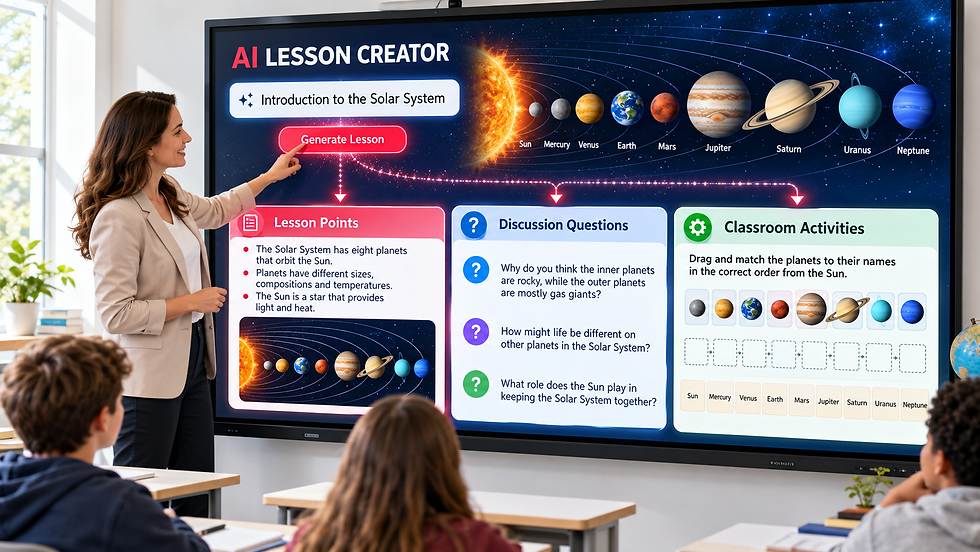
A teacher could enter “The Relationship in family” and use an AI application to generate lesson points, discussion questions and classroom activities.

Some interactive teaching platforms already offer AI-powered lesson and quiz creation. According to Imagetronic Smartboard, Imagetronic AI Assist can generate interactive teaching materials from a single prompt, including classroom activities, quizzes, handouts and complete lessons. This is one example of how AI-enabled whiteboard software can reduce lesson preparation time and create more engaging learning experiences.
5. Handwriting Recognition
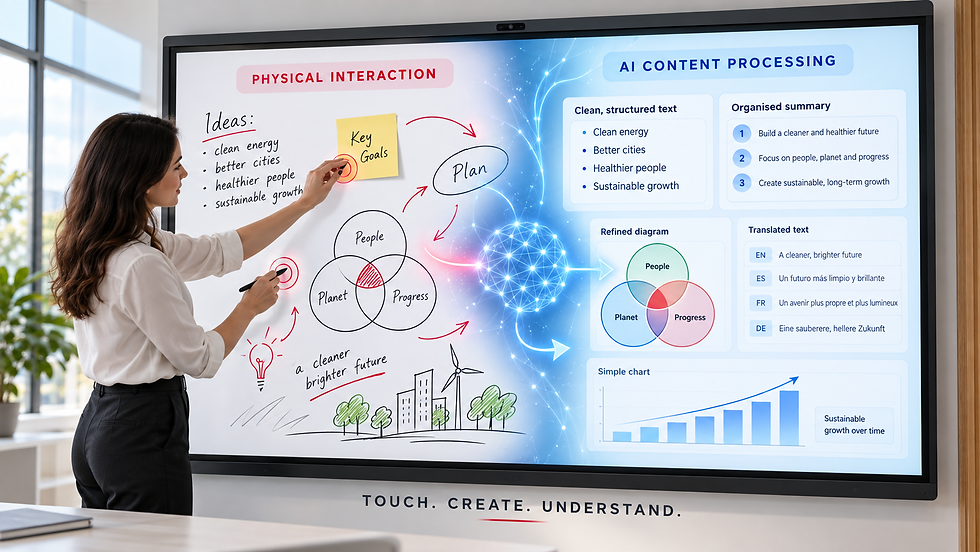
AI-powered handwriting recognition can identify words written on a smartboard and convert them into clean, editable digital text.
This can help users:
Convert handwriting into typed text
Improve the readability of written notes
Search for information within handwritten content
Copy recognised text into documents or presentations
Organise whiteboard notes into clear sections
Save and share notes in a more professional format
For example, a teacher could write lesson points directly on the smartboard, while AI converts the handwriting into structured digital notes for students. During a meeting, handwritten ideas could be transformed into editable text and added to a report or proposal.
Some AI systems may also recognise hand-drawn shapes, arrows and diagrams, automatically correcting them into cleaner visual elements.
Handwriting recognition accuracy depends on the software, handwriting style and supported language. Users should review the converted content before saving or sharing it.
6. Automatic Shape and Diagram Correction
AI can recognise hand-drawn shapes on a smartboard and automatically convert them into cleaner, more professional digital elements.
For example, when a user draws a rough circle, square, arrow or connecting line, the software can correct its shape and alignment while preserving the original meaning.
This function is useful for creating:
Flowcharts
Mind maps
Organisation charts
Process diagrams
Classroom illustrations
Project plans
System workflows
Brainstorming diagrams
Teachers can quickly draw diagrams while explaining a topic, without spending time creating perfect shapes. During meetings, teams can turn rough ideas into organised workflows or project plans directly on the smartboard.

Some AI software may also help users:
Align shapes automatically
Straighten connecting lines
Resize related objects consistently
Recognise common symbols
Reorganise diagram elements
Convert handwritten labels into typed text
Automatic shape correction allows users to draw naturally while AI improves the clarity, consistency and presentation of the final diagram.
7. Summarising Lessons and Meetings
When used with compatible AI software, microphones or video conferencing platforms, a smartboard can help capture and organise information from lessons, training sessions and meetings.
AI may help generate:
Main discussion points
Lesson summaries
Meeting notes
Decisions made
Follow-up actions
Important questions
Key learning points
Assigned responsibilities
For Lessons and Training
After a lesson or training session, AI can organise the main topics into a shorter summary. Teachers and trainers can share it with participants for revision or future reference.
It may also identify:
Topics covered during the session
Questions raised by students
Important explanations
Areas requiring further discussion
Suggested follow-up activities
For Meetings
During or after a meeting, compatible AI tools can convert the discussion into structured notes.
For example, AI may organise the information into:
Key discussion points
Final decisions
Outstanding issues
Action items
Responsible team members
Suggested deadlines
This can reduce the time spent preparing minutes and help ensure that important follow-up tasks are not overlooked.
After a brainstorming session, AI may help organise the discussion into key ideas, decisions and action items.

AI-generated summaries should always be reviewed for accuracy. Participants should also be informed before a meeting or lesson is recorded, transcribed or processed by AI.
8. Speech-to-Text and Voice Control
AI can convert spoken words into digital text and, on supported systems, allow users to control selected smartboard functions through voice commands.
Speech-to-Text
Speech-to-text allows users to speak naturally while AI converts their voice into written content on the screen.
It can be used for:
Dictating lesson or meeting notes
Creating written content without typing
Generating captions or transcripts
Recording discussion points
Supporting users who may find typing difficult
Converting spoken ideas into editable text
For example, a teacher could explain a topic while the smartboard converts the explanation into digital notes for students. During a meeting, spoken discussion points could be recorded and organised into a written summary.
Voice Control
On compatible smartboards and applications, users may also control selected functions through voice commands.
Possible voice-control functions include:
Opening applications
Searching for information
Starting a presentation
Moving to the next slide
Joining a video meeting
Opening documents or websites
Controlling selected display functions
Creating content through voice prompts
For example, a presenter could ask the AI assistant to open a presentation, search for a relevant image or generate a list of discussion points without interrupting the presentation to type.
Speech-to-text and voice-control availability depends on the smartboard model, microphone, operating system, application, internet connection and supported language.
9. Real-Time Translation and Subtitles
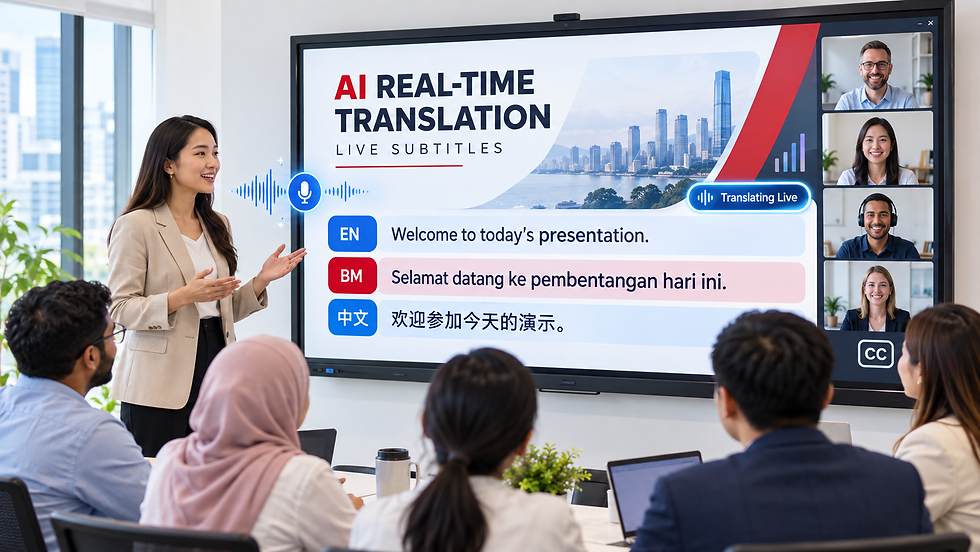
AI can help translate written or spoken content and generate real-time subtitles during lessons, presentations and video meetings.
Depending on the application, users may be able to:
Translate written content into another language
Generate real-time subtitles from spoken words
Display translated captions during presentations
Support multilingual classrooms
Assist international meeting participants
Improve accessibility for participants with hearing difficulties
Save translated transcripts for future reference
This function is especially relevant in Malaysia and Singapore, where classrooms, training sessions and business meetings may involve participants who use English, Bahasa Malaysia and Chinese.
For example, a presenter could speak in English while compatible AI software displays subtitles in another supported language. A teacher could also translate selected learning materials to help students understand unfamiliar terms.
Real-time subtitles can make it easier for remote participants to follow a discussion, particularly when audio quality is inconsistent or when speakers have different accents.
Language availability, translation quality and subtitle accuracy depend on the selected application, microphone quality, speaker clarity and internet connection. Important information should always be reviewed before it is shared or used for official purposes.
10. AI Explanations and Problem-Solving
When used with compatible AI applications, a smartboard can help users understand information, explore ideas and solve problems more effectively.
Users can use AI to:
Ask questions
Simplify complex topics
Explain unfamiliar terms
Generate relevant examples
Work through selected problems
Compare different ideas
Explore a topic in greater detail
Example for Education
During a science lesson, a teacher could ask AI to explain a complex concept in simpler language or generate an example suitable for a particular age group. The explanation can then be displayed on the smartboard for further discussion, annotation and classroom activities.

Example for Business
During a meeting or brainstorming session, a team could use AI to compare ideas, organise information, evaluate possible solutions and identify the next steps. Team members can review and annotate the AI-generated content directly on the smartboard.

Note: AI capabilities and response accuracy depend on the selected application, internet connection and information provided by the user. Important information should always be reviewed before use.
11. AI Camera Tracking and Auto-Framing
An AI-powered camera can automatically detect participants and adjust the camera view during an online lesson, hybrid training session or video meeting. This helps remote participants see the presenter and people in the room more clearly.
Depending on the camera, microphone system and compatible software, the available features may include:
Auto-Framing: Automatically adjusts the camera view to keep everyone in the room visible.
Speaker Tracking: Uses voice detection to identify the active speaker and keep that person in focus.
Presenter Tracking: Follows a teacher, trainer or presenter as they move around the room.
Smart Zoom: Automatically zooms in or out according to the number and position of participants.
Group Framing: Widens the camera view when more participants enter the room.
Close-Up View: Provides a closer view of the person who is currently speaking.
Gesture Recognition: Certain compatible systems may recognise actions such as raising a hand or using selected gestures to activate supported functions.
Note: Camera-tracking, voice-detection and gesture-recognition features vary according to the camera model, microphone system, selected application and software compatibility.
12. AI Voice Detection and Sound Tracking
When paired with a compatible microphone array and camera system, AI can detect the direction of a speaker’s voice and help the camera focus on the active speaker. This is particularly useful for hybrid meetings, online lessons and training sessions involving several participants.
Depending on the hardware and software, the system may support:
Detecting the direction of sound
Identifying the location of the active speaker
Switching the camera view between speakers
Keeping the active speaker in the centre of the frame
Improving voice pickup
Reducing background noise
Reducing echo during online meetings

Voice Tracking vs Voice Recognition
These terms describe different technologies and should not be used interchangeably.
Technology | Meaning |
Voice Tracking | Detects the direction or location from which a person is speaking |
Sound Source Localisation | Uses microphone signals to estimate the position of a sound source |
Voice Recognition | Identifies a speaker or interprets spoken words and commands |
Note: Voice tracking, noise reduction and echo cancellation depend on the microphone array, camera, meeting application and software compatibility.
13. AI Gesture Recognition
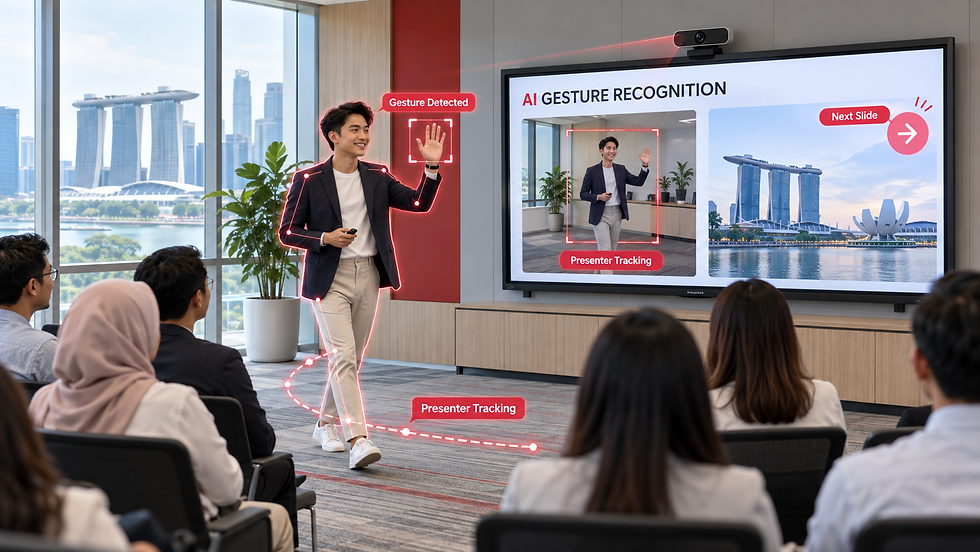
Some AI smartboards and compatible cameras can recognise selected hand gestures or presenter movements, allowing users to interact with supported functions more naturally—even when they are not touching the screen.
Depending on the device and software, AI gesture recognition may support:
Raising a hand to attract attention
Using selected gestures to control supported functions
Moving between presentation slides or content
Starting or stopping selected actions
Detecting the presenter’s position
Following the presenter as they move
Adjusting the camera frame according to body movement
Example
A presenter may move around the room while an AI camera automatically follows and keeps them within the frame. On supported systems, selected hand gestures may also be used to control presentation or camera functions.
Touch Gestures vs AI Gesture Recognition
These are two different methods of interaction:
Technology | How It Works |
The user touches the screen to zoom, move, write, select or erase content | |
A compatible camera detects gestures or body movements made from a distance |
Note: Gesture recognition is not available on every smartboard. It normally requires a compatible AI camera, operating system and supported application. Available gestures and functions may vary between systems.
14. AI Noise Cancellation and Audio Enhancement
AI-powered audio processing can help improve voice clarity during online lessons, training sessions and video meetings by reducing unwanted background noise.
Depending on the microphone system, camera and compatible software, the available
features may include:
Background noise reduction
Echo cancellation
Voice enhancement
Automatic microphone-level adjustment
Focusing on voices within the meeting area
Reducing sounds coming from outside the room
Balancing audio levels between different speakers
These features are particularly useful in open-plan offices, classrooms and large meeting rooms, where air-conditioning systems, surrounding conversations and movement may affect audio quality.

Some AI meeting cameras and conferencing systems combine Auto-Framing, Speaker Tracking, Voice Tracking and AI Audio Processing to provide a clearer experience for remote participants. The camera can focus on the active speaker while the audio system improves voice pickup and reduces distracting sounds.
Note: AI noise cancellation can reduce unwanted sounds, but it may not remove every type of background noise. Performance depends on the microphone array, room acoustics, selected application and software compatibility.
15. Does the AI Run Inside the Smartboard?
Not always. Some AI features may be built into the smartboard’s operating system, whiteboard software, camera or audio system. Other AI tools operate through Android applications, web browsers, cloud services or a connected Windows computer.
There are four common ways to use AI on a smartboard:
1. Built-in AI Software
Certain smartboard brands include AI-assisted features within their operating system or whiteboard software. These may include handwriting recognition, content generation, shape correction or lesson-support tools.
Compatible AI applications can be installed or opened through the smartboard’s Android operating system. Availability depends on the Android version, application compatibility and device specifications.
Users can access browser-based AI platforms directly from the smartboard. These tools usually require an internet connection and may require a user account or paid subscription.
Users can connect a laptop or install a Windows OPS computer to access AI software that requires the Windows operating system. This option is useful for organisations that need specialised applications or a full desktop environment.
AI camera tracking, voice tracking and noise cancellation may also be processed by compatible cameras, microphone systems or video-conferencing software rather than by the smartboard itself.
Important: Purchasing a smartboard does not automatically provide access to every AI feature. Availability depends on the smartboard model, operating system, connected hardware, selected application, internet connection and software subscription.
16. What Should You Check Before Buying?
Before purchasing an AI interactive whiteboard or smartboard, ask the supplier the following questions:
AI Features and Compatibility
Which AI functions are included with the smartboard?
Which functions require additional applications or hardware?
Does the smartboard support compatible AI applications?
Is Google Play or another application platform available?
Is a Windows OPS or connected laptop required?
Which operating systems and applications are supported?
Cost and Connectivity
Is a software account or paid subscription required?
Does the AI require a continuous internet connection?
Are future software updates included?
Are there additional charges for AI features, cloud storage or user licences?
Language Support
Which languages are supported?
Does it support English, Bahasa Malaysia and Chinese?
Are speech recognition, subtitles and translation available in the required languages?
Privacy and Data Security
Can AI functions, cameras and microphones be disabled by an administrator?
Is audio or video recorded during use?
Is user information processed locally or uploaded to the cloud?
Where is the data stored, and how long is it retained?
Can stored information be deleted?
Who can access the collected data?
Does the system meet the organisation’s privacy and security requirements?
Support and Maintenance
Is technical training provided?
Is local technical support available in Malaysia or Singapore?
Who provides support for third-party AI applications?
How long will the operating system and software receive updates?
Privacy is especially important for schools, government departments and businesses. Organisations should understand how audio, video, documents and user information are processed before enabling AI features.
17. Limitations of AI Interactive Whiteboards
Although AI can make smartboards more useful for teaching, training and meetings, users should also understand its limitations:
AI-generated information may contain errors or outdated information.
Some AI functions require a stable internet connection.
Advanced features may require paid subscriptions or additional user licences.
Language availability and accuracy vary between applications.
Translation, transcription and voice-recognition results may not always be accurate.
Sensitive or confidential information should not be uploaded without proper approval.
Teachers, trainers and employees should review AI-generated content before using or sharing it.
Camera tracking, gesture recognition and audio enhancement require compatible hardware and software.
Available AI functions depend on the smartboard model, operating system and selected applications.
Software updates may change the availability or performance of certain features.
AI should be used as a supporting tool—not as a replacement for professional judgement, human review or responsible decision-making.
18. Conclusion
An AI interactive whiteboard combines the collaborative experience of a smartboard with tools that can generate, understand and organise content. Depending on the software being used, it may assist with handwriting recognition, lesson creation, quizzes, translation, summaries, voice control and brainstorming.
AI does not replace teachers, trainers or meeting participants. Instead, it can reduce repetitive work and help people prepare, present and collaborate more efficiently.
Imagetronic Smartboards provide an interactive Android platform that may be used with compatible AI applications and web-based tools. Available AI functions depend on the selected model, application, internet connection and software subscription.
Want to explore how a smartboard can support AI-powered teaching, training or meetings? Discover Imagetronic Smartboards or contact our team to discuss a suitable setup for your organisation.
Comments